
Meta Ads Delivery Warnings: Common Statuses and Fixes
Last Updated on November 6, 2026 by chada sravas
A useful guide for understanding the states reflected in the Delivery section of Meta Ads Manager, their causes, and methods of rectifying them. Keep in mind that terms and definitions may vary, so consider the on-screen help tooltip (hover over the status option) to be the last word for your account.
Inspect the status of the campaign, ad set, and ad separately, as any uncertainty at any higher extent can hinder the progress of a campaign.
How statuses are grouped
| Group | Statuses |
| Active | Active, Learning |
| Warning | Learning Limited |
| Pending | Scheduled, In Review, Processing, Preparing |
| Error | Rejected |
| Inactive | No Ads, Ad Off or Ad Set Off, Completed |
Active
What it means: This indicates that the campaign, ad set, or ad is operating normally and can participate in the auctions.
What to check: Just because the ad is marked as ‘active’ doesn’t mean that money is being spent and your impressions are strong. Check the corresponding information, like the audience size, budget, bid or cost cap, payment status, or anything preventing the ads from showing.
Learning
What it means: A newly created or significantly ad set being optimized by Meta for your selected optimization event. Results can be erratic during this period.
What to check :
• Impressions, clicks, and conversions are being accumulated.
• There are no significant recent edits that have restarted the phase.
How to handle it:
• Allow time for data to build up.
• Avoid frequent changes. Significant edits such as budget, targeting, optimization event or new creative can reset the learning phase.
• Bundle planned changes and make them together rather than one at a time.
• To test something new, consider a new ad set instead of editing a live one.
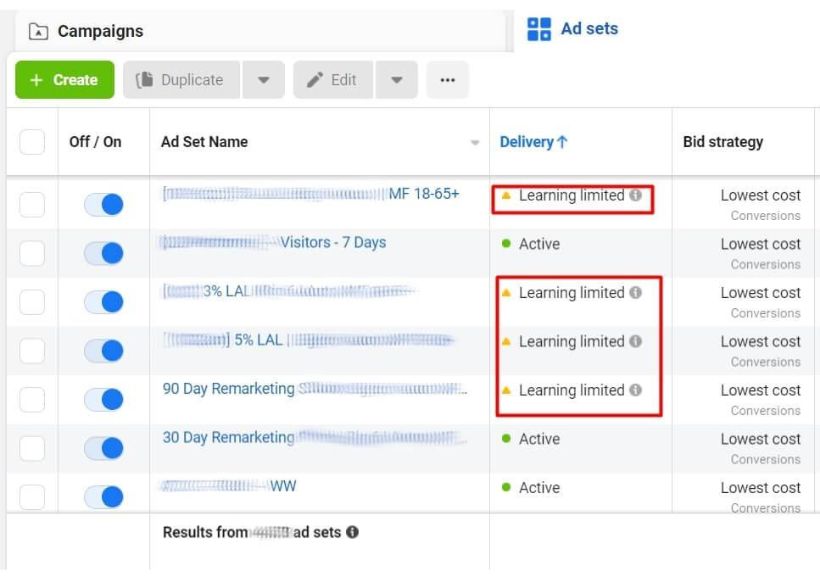
Learning Limited
What it means: The ad set is not producing sufficient optimization events to leave the learning stage at its current rate. Ads may still function, but deliveries are less effective and outcomes may vary.
Common causes:
• Low conversion volume.
• Small target audience.
• Insufficient budget.
• Too many separate ad sets splitting the data.
• An optimization event that occurs too rarely.
How to fix it:
• Combine similar ad sets.
• Broaden the audience where appropriate.
• Review the budget against your cost per result.
• Choose an optimization event that happens more often.
• Avoid unnecessary significant edits.
Meta generally uses about 50 optimization events within seven days as the learning benchmark. This is a guideline, not a requirement for every campaign.
Scheduled
What it means: The ad is set to start at a future date or time.
What to check:
• Ad set start date and time.
• Selected time zone.
• Campaign, ad set and ad are all switched on.
How to fix it:
Confirm the start time, or edit the schedule if the ad needs to run earlier.
In Review
What it means: Meta is checking the ad against its Advertising Standards before it can run.
What to check:
• Ad text and headlines.
• Images and videos.
• Landing page URL and content.
• Notifications about advertising policies.
How to handle it:
Wait for the review to finish. Most reviews complete within 24 hours, but some take longer. If the review is significantly delayed, check Account Quality and contact Meta Support.
Processing
What it means: Meta is applying changes you made to an ad, ad set or campaign.
Typical triggers: Edits to creative, headlines or descriptions, placements, destination URL, pixel or tracking settings, budget, schedule or targeting.
How to handle it: Let the changes complete their process. Do not make the same edits over and over again. If nothing happens after you give it a reasonable amount of time, check the ads for any error messages.
Preparing
What it means: The ad has been submitted and is being prepared for delivery. It is one of the Pending statuses, alongside Scheduled, In Review and Processing.
What to check:
• Campaign start date.
• Ad set budget.
• Audience settings.
• Campaign, ad set and ad are all switched on.
How to handle it:
Allow time for delivery to begin. If the ad stays in Preparing longer than expected, review its settings and contact Meta Support if needed.
Rejected
What it means: Meta found that the ad does not comply with its Advertising Standards.
Common causes:
• Misleading or unsupported claims.
• Restricted products or services.
• Inappropriate creative content.
• Copyright or trademark violations.
• Landing page policy violations.
How to fix it:
1. Open the rejected ad in Ads Manager and read the rejection reason. More detail is available in Account Quality.
2. Identify the specific policy violation.
3. Either edit the ad and submit it for review again, or request a review (appeal) if you believe the rejection is a mistake.
4. Check the status again after the review completes.
Note: Repeated violations can lead to restrictions on the ad account, so fix the underlying issue rather than resubmitting unchanged ads.
Ad Off, Ad Set Off and No Ads
What it means: Delivery is stopped because something is switched off, or the ad set contains no ads.
What to check:
• The on/off toggle at Campaign, Ad Set and Ad levels.
• Whether the ad set has at least one ad.
• Whether an automated rule paused the ad.
How to fix it:
Switch the relevant level back on or add an ad, then confirm the status changes.
Completed
What it means: The scheduled end date has passed and delivery has finished.
How to fix it: To keep running, extend the end date or create a new campaign or ad set.
Not Delivering and other delivery messages
What it means: The item appears active but is not spending, or a tooltip names a specific blocker. Hover over the status to read the exact message.
Common causes:
• Campaign, ad set or ad switched off, or the end date reached.
• Budget exhausted or an account spending limit reached.
• A bid cap or cost cap that is too restrictive.
• An audience that is too small or has no eligible people.
• Heavy audience overlap between ad sets.
• Automated rules that paused the ad.
• Account restrictions, a disabled ad account or a payment failure.
How to fix it:
Check delivery at Campaign, Ad Set and Ad levels, then verify the schedule, budget, bid settings, payment method and any account restrictions before restarting the ad.
Ads that need attention
At times, an advertisement’s ability to deliver can be affected by a hidden issue. Meta doesn’t always include this as a known status, but it is advised to check the ad notification.
Possible causes:
• Facebook Page or Instagram account access problems.
• The original post used for the ad was deleted.
• An expired offer.
• Missing creative information.
• Configuration or payment problems.
How to fix it:
Open the affected ad, read the notification, correct the specific issue, publish the change and check the status again.
Ad Relevance Diagnostics
Meta provides three rankings that compare your ad against ads competing for the same audience.
| Ranking | What it measures | What to improve |
| Quality Ranking | Perceived ad quality | Creative and landing page |
| Engagement Rate Ranking | Expected engagement | Ad copy and visuals |
| Conversion Rate Ranking | Expected conversion performance | Landing page and offer |
The ranks show whether an ad performs Above Average, Average or Below Average (with specifics like Below Average in the last 35 percentiles sometimes).
Where to find them: In Ads Manager, under Ads tab, go to the Customize Columns option on the dashboard and add the Quality, Engagement Rate and Conversion Rate ranking.
Why they may be blank: Ads need a certain amount of Impressions (about 500) before ratings show. New ads or those with low ad volume may have nothing to show in the box.
Performance Issues (not delivery statuses)
Audience Too Narrow
A small eligible audience can limit reach and delivery.
What to check: Location targeting, audience exclusions and unnecessary detailed targeting restrictions.
How to fix it: Broaden the audience where appropriate.
Ad Fatigue
People see the same ad repeatedly and performance declines.
What to check: Frequency, CTR, CPC and cost per lead over time.
How to fix it: Refresh images, videos and ad copy when performance declines.
Quick Reference
| Status | Meaning | First thing to check |
|---|---|---|
| Active | Running and eligible to deliver | Spend and impressions |
| Learning | Ad set is gathering data to optimize | Avoid significant edits |
| Learning Limited | Too few optimization events | Consolidate ad sets, broaden audience |
| Scheduled | Starts at a future date | Start date and time zone |
| In Review | Being checked against policies | Wait, then check Account Quality |
| Processing | Changes are being applied | Avoid repeated edits |
| Preparing | Being prepared for delivery | Schedule, budget, toggles |
| Rejected | Violates advertising policies | Rejection reason, edit or appeal |
| Ad Off / Ad Set Off / No Ads | Switched off or empty | Toggles and ads in the ad set |
| Not Delivering | Active but not spending | Tooltip, budget, bids, payment |
| Completed | Scheduled delivery finished | End date |
