
Why Does OnePlus Green Line Issue Happen? Software or Hardware?
Last Updated on September 21, 2026 by chada sravas
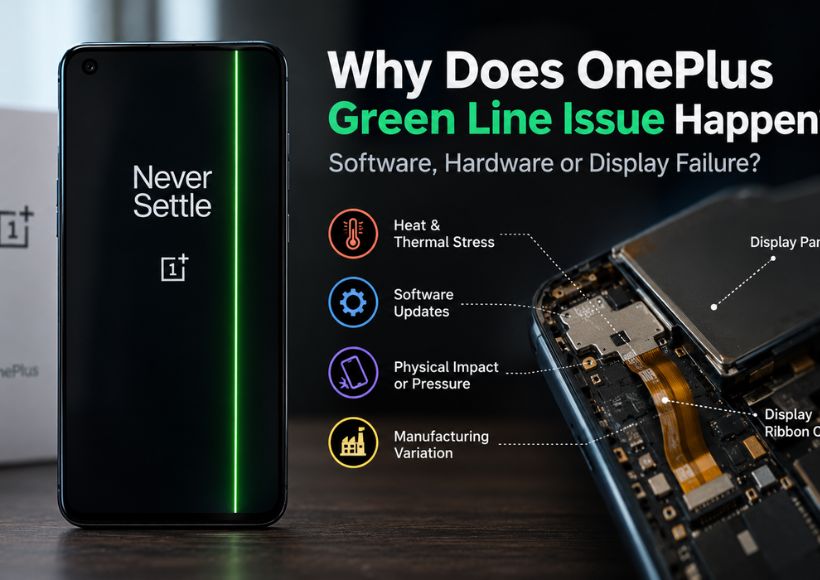
A green line on a OnePlus AMOLED display is easy to blame on the last software update because many users report noticing it immediately after an update. But the timing of the update does not, by itself, prove that the software created the line. OnePlus itself does not identify a single cause. Its current green-line policy says that green lines can appear on any AMOLED device and can be caused by various factors.
The more useful way to understand the problem is to separate the underlying failure from the event that happens just before the failure becomes visible. An update, gaming session, charging session, or even normal use may coincide with the moment the line appears without necessarily being the original cause.
If you want a basic explanation of what the green line is and the common symptoms behind it, see our guide on [What Is Green Line Issue In OnePlus?].
The green line is usually a display-side electrical failure.
A continuous straight green line is not the same as a momentary glitch. OLED screens have pixels that can be controlled independently, plus the circuit for powering the pixels. If part of the display circuitry fails, a vertical line can remain visible because the affected pixels are no longer being driven normally.
iFixit notes that green or purple lines on OLED displays indicate an electrical issue within the screen. It also explains that damage to the display can affect particular pixel columns, producing visible coloured lines. Such damage does not always have to be obvious from the outside; display failures can also occur because of manufacturing faults or imperceptible damage.
This is why restarting the device does not guarantee that the green line will go away forever. A problem may occur in the phone’s display, even though the operating system is functioning well.
A persistent green line is more consistent with a display-hardware problem than with a temporary software glitch. Even though the software can have an impact on the image shown on the screen, its constant presence on the screens of the device means that the most likely cause is a malfunction of the display hardware.
Why can a display fail when there is no crack or visible damage?
A common assumption is that a green line must mean the phone was dropped. That is not necessarily true.
The display assembly contains extremely small electrical connections and components. A display can develop a fault without the user seeing a crack on the glass. iFixit specifically notes that display failures can occur from manufacturing faults or damage that is not visibly apparent.
This matters in the OnePlus green-line discussion because many user reports describe the line appearing suddenly while the phone was still physically intact. Those reports establish that the issue can be observed without obvious external damage, but they do not tell us the exact internal failure mechanism in every individual phone.
Possible contributors include material degradation, repeated thermal cycling, physical stress, moisture, and manufacturing variation, which are present in the OnePlus phone. All these factors can be considered possible causes of trouble in the device, though they cannot be taken as the reason for all cases.
Can heat cause the OnePlus green line?
Heat is one of the explanations that gets talked about often because mobile devices continuously change temperature during gaming, charging, use of the camera, and during high processing tasks.
The significant difference lies in the fact that heat can be a possible factor, and one has to show that a specific temperature causes a specific green line.
A phone does not need to become visibly damaged for repeated heating and cooling to affect materials and microscopic connections over time. If a display already has a vulnerable component or connection, repeated thermal cycling could potentially contribute to its deterioration.
At the present time, there does not exist a publicly available technical document from OnePlus that defines the temperature at which its screens develop the green lines. According to OnePlus, AMOLED green lines are caused by many variables but does not elaborate on them.
There is also an interesting clue in OnePlus’s newer display design. The company says its PVX Enhanced Edge Bonding adds another layer of protection to the edges of its AMOLED displays and specifically describes the technology as protection against conditions such as heat and humidity in India. OnePlus says this bonding layer has been integrated into the AMOLED displays of its flagship and Nord series phones, including the OnePlus 13 series.
This does not validate that heat was the factor that caused the green-line failures in previous models. It does indicate that the issue of display-edge durability and surrounding conditions has been dealt with by OnePlus in their newer models.
Then why do so many people notice the line after a software update?
This is where the discussion becomes confusing.
There are numerous community reports from OnePlus owners describing a green line appearing during or shortly after a software update. For example, users in OnePlus communities have described the line appearing during an update, while other users report getting the same problem without updating their phones at all.
That difference is important.
If an update were the direct software cause, we would expect the evidence to point in that direction consistently. Instead, community reports contain both situations: green lines appearing after updates and green lines appearing during ordinary use without an update.
One possible explanation discussed by users is that the update process can temporarily increase device activity and heat, potentially exposing a display that was already vulnerable. But this remains a community theory, not an established OnePlus explanation. Some Reddit users specifically argue that update-related heating may trigger an existing display weakness, while others report green lines appearing without any recent update.
So the safer conclusion is:
A software update may coincide with the appearance of a green line, but the timing alone does not establish that the software update physically damaged the AMOLED panel.
That distinction is important because telling users to stop updating their phones treats an unproven explanation as a fact.
Is the green line a manufacturing defect?
It can be, but not every green-line case can automatically be classified as a manufacturing defect.
A manufacturing problem is one possible explanation for a display that fails despite normal use. OLED displays contain complex layers, pixel structures, and electrical connections, and a fault may not become visible when the phone is new.
Simultaneously, there can be damage to the phone display due to its usage, physical stress, moisture, and other external elements.
That is why the actual history of an individual device is of great importance. Two smartphones may present the same green line, but events prior to their failure can be quite different.
The existing policy of OnePlus also reflects this difference. It offers free replacement of the screen in relation to eligible green-line instances provided by authorized service channels; however, a lifetime warranty statement states that no human or extrinsic damages are covered by the warranty and that the terms depend on the condition of the phone at the service center.
So “green line = manufacturing defect” is too broad. The visible symptom tells us there is a display problem; it does not automatically establish why that particular display failed.
Does Samsung vs BOE explain the OnePlus green-line problem?
This is one of the most repeated theories in OnePlus communities.
Older OnePlus models are frequently discussed alongside Samsung-supplied AMOLED panels, while community discussions around newer generations often mention BOE displays. Some users therefore associate the earlier green-line reports with Samsung panels and believe that moving to BOE reduced the problem.
But there is a major limitation: community reports are not the same as failure-rate data.
People who experience a display failure are much more likely to post about it than people whose display continues working normally. That creates a selection effect. Seeing many reports about one model or display supplier does not tell us the percentage of devices affected.
Moreover, OnePlus has not provided a public dataset that would prove the rates of green line failures distinguishing between manufacturers. Thus, to claim that only Samsung panels are to blame for the issue or that BOE panels have solved the problem would be incorrect.
What one can say is that the design of displays and also bonding technology have changed, and OnePlus now emphasizes the inclusion of PVX Enhanced Edge Bonding in its approach to the durability of AMOLED technology.
This is stronger evidence than the mere reiteration of the Samsung vs. BOE theory.
How can you tell whether the problem is actually hardware?
There is an easy observation which will give you a good hint.
If you can see the green line while switching between apps, settings, and the various sections of the OS; if you can see it after restarting the device; and even when the phone starts up, the issue is more likely related to the hardware than to any software.
A screenshot test can provide another clue. If you take a screenshot and view that screenshot on another device and the green line is absent, the physical display becomes a stronger suspect. If the abnormal line is actually present in the screenshot itself, the problem may involve the rendered image, software, or graphics pipeline.
The tests cited in this context should not be considered as laboratory tests. They help to identify what signals are being sent from the device to the screen.
As far as the constant line is concerned, it will help you find out whether it is a display-side failure. Other guides on OLEDs also associate fixed green and purple lines with issues in the display.
Why did OnePlus introduce a lifetime display replacement policy?
OnePlus’s response is interesting because it does not indicate that the issue is due to one specific software update or one specific component.
Rather, its current “Green Line Worry-Free” page admits that green lines can appear on AMOLED devices due to several factors and offers free display replacement through authorized channels for qualifying devices. According to OnePlus, the policy covers devices sold via authorized online and offline channels.
The company also currently promotes a lifetime display warranty for the green-line issue on its India website. However, “lifetime” does not mean every possible screen failure is automatically covered forever. The published disclaimer says free replacement is available within the parts-supply period and excludes human or external damage, with the device condition assessed at the service centre.
That distinction is important when discussing the policy.
The warranty response is evidence of how OnePlus is addressing the problem, but it should not be presented as a blanket admission that every green line is a manufacturing defect.
For the practical side of the problem including free replacement, service-centre assessment, parts availability and warranty conditions, see our [OnePlus Green Line Screen Issue service guide].”
What changed with newer OnePlus displays?
OnePlus’s newer approach is particularly relevant because it gives us something more concrete than internet theories.
The company says the OnePlus 13 Series uses PVX Enhanced Edge Bonding, adding protection around the edges of its AMOLED displays. OnePlus specifically connects the technology with protection against environmental conditions such as heat and humidity and says the bonding layer has been integrated into AMOLED displays across its flagship and Nord series phones.
This does not signify that a new OnePlus phone will not eventually develop a green line. Instead, OnePlus has changed its approach to preventing display problems and made a formal announcement of that change; OnePlus wants to make sure everybody knows this is an improvement regarding display durability.
This is a more valuable conclusion than stating only that “newer OnePlus phones are not affected by the green-line issue.”
The part that is still not proven
There is no single publicly confirmed cause that explains every OnePlus green-line case. When the line is persistent, the evidence points more strongly toward a display-hardware problem, but the reason that hardware failed can vary. Heat and repeated thermal cycling may contribute, while physical stress, moisture, aging, and manufacturing variation are also possible factors.
The appearance of a green line on the monitor after installing the updated software is not a confirmation that the update caused the display to malfunction. In the same way, various community theories about Samsung or BOE displays cannot be used to decide whether their failure ratios are different in the absence of credible public data.
OnePlus itself does not identify one universal cause. Instead, the company acknowledges that AMOLED green lines can result from various factors, provides display replacement support for eligible cases, and has introduced newer AMOLED edge-bonding technology in its recent devices.
