
Jira Data Center End of Life: Timeline, Cost & Migration
Last Updated on September 18, 2026 by chada sravas
The announcement by Atlassian on March 28, 2029 regarding the end of Data Center products is beyond just product lifecycle announcement. Organizations making use of the Jira platform will now have to plan for a period during which they will migrate their Data Center products through various processes that involve licensing, architecture of applications, controlling security, linking third party applications, governing users and making investments.
Consequently, for organizations that might have from several hundred to several thousand users of Jira, the key question is whether to “move to Cloud.” The practical question involves how to evaluate the current Data Center footprint, find business processes that will not transition seamlessly, calculate future operating costs, and carry out migration or replacement before licensing and support restrictions are effective operational deadlines.
The Phased Sunsetting Timeline and Licensing Rules
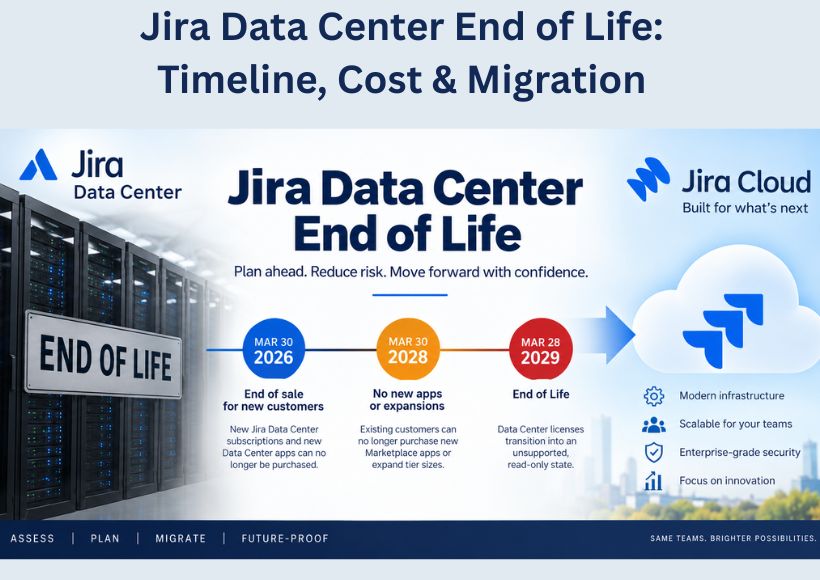
The retirement of the Data Center application is a planned process occurring over time and not simply ending in one moment. Existing customers have been given the opportunity to continue using Data Center in order to analyze their current situations and plan further actions.
The major milestones are:
March 30, 2026: New clients are unable to acquire new affected Data Center subscriptions and also new apps of the Data Center Marketplace.
March 30, 2028: Existing clients can no longer take new subscriptions of Data Center, upgrade their ongoing packages, and acquire new marketplace apps and upgrades.
March 28, 2029: Affected subscriptions and apps expire and go to read-only state.
The last milestone has great operational importance. Read-only access doesn’t indicate that Jira will work properly without assistance. The provider indicates that the clients will have access to existing information only, and no new actions can be performed starting with the end of the subscription. The renewals can be made before EOL, but they cannot be done after March 28, 2029.
Consideration must also be given to the full range of products being assessed: These include Jira Software Data Center, Jira Service Management Data Center, Confluence Data Center, Bamboo, Crowd, other affected Atlassian and Marketplace apps, and any relevant Data Center items. Products like Bitbucket Data Center and Jira Align Data Center are different from those in this category and should not be included here.
Financial Impact: The TCO Calculation Is More Than License Price
A Data Center-to-Cloud argumentation should include TCO analysis and not just a comparison of Data Center contract costs to Cloud proposal costs.
Unused environments incur costs like server costs, storage costs, database infrastructure costs, back-up costs, disaster recovery costs, maintenance costs, network capacity costs, security tools costs, and the cost of staff to run the platform and to constantly upgrade it. Some of those costs might be already integrated in a company’s IT budget.
The cloud modifies the expense structure. Jira Cloud is paid and guided by users. The pricing guidelines of Atlassian now describe two plans named Standard and Premium with a price based on the number of users. The price in the Enterprise plan is created after negotiations. There is also Maximum Quantity Billing applied in the case of Cloud monthly charges in which the bill depends on the maximum number of assigned seats. The other layer of subscriptions originates from Marketplace applications.
That makes user governance financially important. Dormant accounts, contractors, service users, duplicated identities, and unnecessary application access can increase recurring expenditure. Marketplace applications also need to be evaluated individually because their Cloud pricing, functionality, and migration path can differ from their Data Center equivalents.
Migration itself creates another cost category: engineering time. Teams may need to redesign workflows, replace scripts, rebuild integrations, validate permissions, remediate unsupported custom fields, and perform repeated test migrations. Network and integration architecture should also be reviewed for any data-transfer or third-party infrastructure costs rather than assuming they disappear simply because the core application becomes SaaS.
Consequently, a credible TCO model should include license/subscription cost + Marketplace apps + migration labor + integration remediation + governance overhead + retained infrastructure during transition.
Technical Governance: Custom Code, Extensibility, and Security
In many cases, the highest migration risks will be concealed below the visible Jira configuration layer.
For companies using a lot of ScriptRunner/Groovy automation, developing custom workflow functions, utilizing various types of integration, setting up custom fields, relying on external identity directories, or having their applications based on Data Center-specific APIs, it is critical to conduct an application-level assessment before scheduling the migration date. It should be kept in mind that a configuration that works in Data Center does not mean that it will work in Cloud without change.
The Jira Cloud Migration Assistant (JCMA) from Atlassian conducts pre-migration checks, assessments of apps, user preparation, and data migration. However, the documentation provided by Atlassian clearly states that specific entities do not get migrated automatically. Custom fields and some non-standard functions of the workflow may not get migrated and thus may need to be created manually or migrated by alternative means.
Compliance involves more than simply posing the question of whether “Cloud is secure.” In fact, what must be evaluated is whether the Cloud architecture used meets all regulatory and contractual requirements within that company. Atlassian provides data residency controls for Jira. They also offer data storage options in regions such as EU, US, India, Australia, Japan, Singapore, Canada, Germany, UK, South Korea, and Switzerland. However, data residency means that only in-scope data is restricted in that way, but that does not automatically mean that every aspect of processing or integration is based only in the selected geographical location.
Regulated organizations should therefore map data flows, identity controls, retention requirements, third-party applications, legal requirements, and vendor-specific compliance documentation before approving the target architecture.
Decision Matrix: Cloud Migration or Self-Hosted Alternative?
Organizations having Agile requirements satisfied by Atlassian Cloud should start the migration journey from assessment rather than production migration. JCMA is the recommended migration tool of Atlassian and provides pre-migration checks, reports, app assessment, and selective migration.
In a developing migration program, a staging environment must be in use, several test migrations brought about, and entity mappings reconciled, in addition to downtime measurement, integration checks, and business-user acceptance testing prior to the production cutover.
However, some organizations may have requirements that make another self-hosted platform worth evaluating. JetBrains YouTrack Server, for example, can be hosted on an organization’s own infrastructure and provides control over where data is stored and how the environment is managed. Easy Redmine can also be evaluated where enterprise project-management and self-hosting requirements are important. Open-source/self-hosted products such as Plane provide another category of alternative, although feature and migration parity with Jira must be assessed rather than assumed.
The comparison should therefore focus on actual requirements: workflow complexity, permissions, integrations, reporting, Marketplace dependencies, compliance, data residency, customization, administration effort, and five-year TCO.
Pre-Migration Audit Checklist
Before selecting a migration date, IT decision-makers should:
Examine dormant users, duplicate accounts, specific fields, workflows, designs, projects, and configuration that have outlasted their purpose in any given organization.
Make an inventory of the Marketplace applications and verify if the Cloud is available and working properly as it was planned when the pricing was proposed.
Identify those who need to change their ScriptRunner/Groovy scripts, functions in workflows, APIs, webhooks, database dependencies, and other external integrations that need to be changed.
Perform JCMA pre-migration assessments and document every error or unsupported entity.
Run repeated non-production migrations and reconcile users, permissions, issues, attachments, workflows, and application data.
Establish measurable downtime, rollback, validation, backup, and business-acceptance criteria.
Build a five-year TCO model covering Cloud subscriptions, Marketplace apps, migration labor, retained infrastructure, and ongoing administration.
Strategic Summary
Although March 2029 may seem far away, migrating to enterprise-level Jira is hardly a matter of switching licenses. The most difficult scenarios involve systems in which years of custom code and third-party software, and integrations have been added combined with regulations and a large user volume. Those organizations starting with a comprehensive list of technical and financial elements can transform the EOL deadline into a managed transformation initiative, not just an emergency migration.
Also Read : Comparison Of Jira Cloud And Data Center
